Pixelmost vs Mowgli for AI App Prototypes
Pixelmost and Mowgli both help people move from an app idea toward something visual. They are not solving the same problem. One is a focused Apple-device app prototyping workflow; the other is a broader AI product design canvas with spec, Figma, code, and agent handoff paths.
This comparison is for founders, solo developers, product teams, and agencies deciding whether they need a mobile-first app concepting tool or a wider product-design environment. It compares Pixelmost and Mowgli by workflow: platform, prototype depth, mobile focus, export, handoff, app-icon work, TestFlight preparation, collaboration, and where each tool should not be forced.
Short answer
Choose Pixelmost when the job is specifically to create, review, and present a mobile app concept for iPhone, iPad, or Mac, with app mockups, Graph Mode, app icons, and a path toward TestFlight preparation. Choose Mowgli when the job starts earlier or wider: scoping the product, exploring visual directions, mapping every state and flow, collaborating with a team, and handing work into Figma, React, Tailwind, or AI coding agents.
Decision table
| Need | Best fit | Why it matters |
|---|---|---|
| Mobile app concept on Apple devices | Pixelmost | Pixelmost is available for iOS, iPadOS, and macOS and is built around mobile app mockups, prototype review, app icons, and Apple-device workflows. |
| Product spec and broad app mapping | Mowgli | Mowgli emphasizes questionnaires, product specs, full-product flows, visual directions, and designs for mobile, web, or desktop. |
| Fast visual app pitch | Pixelmost | Pixelmost is useful when the immediate output is pitch-ready mobile screens, compositions, a prototype flow, or an app-icon direction. |
| Figma/code/agent handoff | Mowgli | Mowgli is stronger when the handoff target is Figma, React and Tailwind code, or a package for AI coding tools. |
| App icon and TestFlight-adjacent workflow | Pixelmost | Pixelmost includes app icon generation and TestFlight-oriented preparation on higher plans, which makes it more specific to app launch exploration. |
The workflow difference
Pixelmost works best when the project is already framed as a mobile app. You start with an idea, generate or assemble screens, refine the look, inspect the flow, create app-icon directions, and prepare visual material for review. The core question is: can this app concept be understood, improved, and tested as a mobile experience?
Mowgli works best when the project needs a broader product-design layer. Its official positioning covers a canvas for mobile, web, and desktop apps; scoping from scratch or imported Figma/product context; moodboard exploration; designs for states and flows; chat-based iteration; collaboration; and handoff to Figma, React and Tailwind code, or AI coding agents. The core question is: can the whole product be specified, designed, and handed toward implementation?
That distinction matters because many searches for “AI app prototype” mix two intentions. Some people want a realistic mobile mockup they can show today. Others want an AI-assisted design system and build package. The right tool depends on which of those jobs is in front of you.
Where Pixelmost is stronger
- Mobile specificity: Pixelmost narrows the workflow to app screens and Apple-device review instead of trying to cover every interface category.
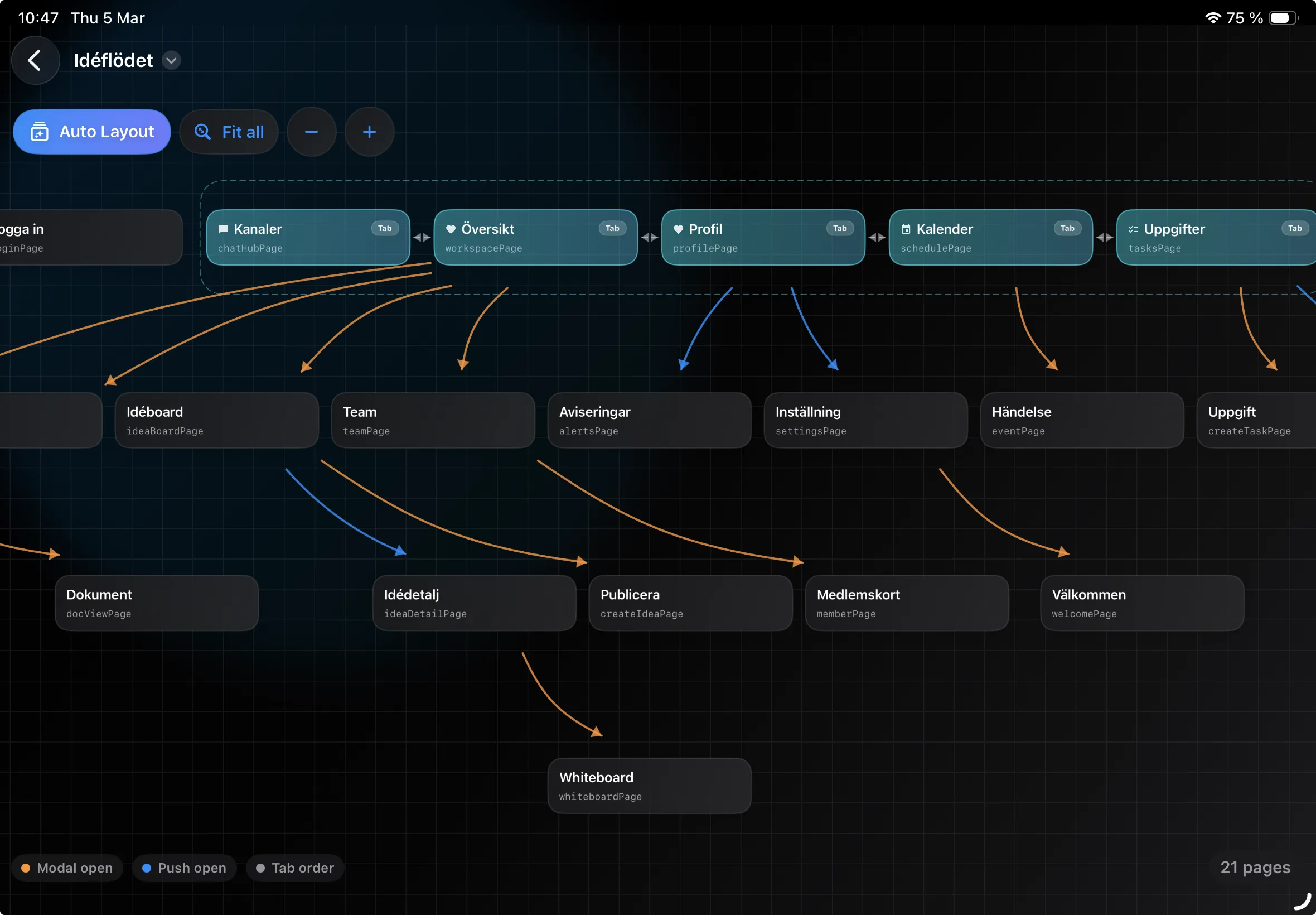
- Graph Mode: Pixelmost can show connected screens as a flow map, which helps teams spot missing paths, dead ends, and crowded hubs before a prototype review.
- App icon direction: Pixelmost keeps app-icon generation close to the mockup workflow, which is useful for early pitch, App Store, and product identity work.
- TestFlight path: Pixelmost is more relevant when a concept may later need App Store Connect and TestFlight preparation rather than only design-file handoff.
- Low-friction concepting: Pixelmost is a practical fit for founders and product teams who want to get from prompt to mobile screens quickly without opening a broad product-spec process.
Where Mowgli is stronger
- Product scoping: Mowgli is designed to ask questions and maintain product context, which helps when the team has not fully decided what the product should contain.
- Visual direction exploration: Mowgli includes moodboard-style exploration before committing to a full design direction.
- Whole-product coverage: Mowgli positions itself around every state and flow across mobile, web, and desktop, not only the mobile app concept.
- Team collaboration: Mowgli is a better fit when multiple people need to review, share, and iterate in a product-design canvas.
- Implementation handoff: Mowgli has a stronger story for Figma, React/Tailwind output, and AI-agent packages.
Prototype depth
For a five-screen mobile app idea, Pixelmost is usually the more direct route. You can focus on the screens, navigation, icon direction, color theme, and pitch material. The prototype does not need to become a complete product specification before it is useful.
For a larger product with many roles, flows, permissions, states, and build-team handoff needs, Mowgli may provide the better planning layer. Its value is less about a single mobile screen and more about keeping product context, flow coverage, and implementation references together.
A useful rule: if you would judge the result by tapping through an app idea on an iPhone, start with Pixelmost. If you would judge the result by whether a team can take a product spec, design direction, and code handoff package into production, test Mowgli.
When not to choose Pixelmost
Do not choose Pixelmost as a full replacement for a team design system, a Figma component library, or an AI code generation workflow. It is focused on mobile app concepts and app-specific review. If your team already has a mature Figma library, React component system, and product spec process, Pixelmost is better used as a fast concepting side workflow than the center of the entire design organization.
When not to choose Mowgli
Do not choose Mowgli if the task is deliberately smaller: make a fast mobile app mockup, explore an app icon, review an app flow, or create pitch-ready screens without turning the session into a broader product-spec and handoff workflow. A larger canvas can be the wrong tool when the project needs speed and focus.
A practical test assignment
Run the same brief in both products: “Create a seven-screen iPhone prototype for a subscription meal-planning app with onboarding, recipe preferences, weekly plan, grocery list, paywall, settings, and support.” Then compare the result on these questions:
- How quickly did the tool create usable mobile screens?
- Could you inspect the app flow as a whole, not only individual pages?
- Did the output handle secondary paths such as support, settings, empty states, and account recovery?
- Could you generate or align the app icon with the app concept?
- Was the next step a stakeholder review, a design-system handoff, a code handoff, or device testing?
Recommendation
Pixelmost is the sharper choice for mobile app founders, designers, and teams who need app mockups, app-flow review, app-icon exploration, and a route toward Apple-device testing. Mowgli is the stronger fit when the work is broader: scoping the product, designing across platforms, collaborating around a spec, and handing work toward Figma, code, or AI coding agents. If the question is “what should the app feel like on a phone,” start with Pixelmost. If the question is “how do we define and hand off the whole product,” compare Mowgli seriously.
Related Pixelmost pages
- App Prototype Tool for connected mobile app flows.
- App Flow Visualizer for Graph Mode and navigation review.
- AI Logo Maker for app icon concepts.
- TestFlight Upload for app testing preparation.